
Desmos is most useful when you know what mathematical relationship you want to inspect. It can help you find intersections, check roots, and explore a model, but it cannot decide which quantity a word problem asks for. Learn to move between a written equation, a graph, and a plain-English explanation.
Practice with the testing calculator
Desmos explains in its assessment FAQ that the testing version may differ from the public calculator. Bluebook provides graphing and scientific options for the digital SAT. Practice with the relevant testing experience so your first encounter with its controls is not on test day.
Check the current College Board calculator policy before bringing a separate calculator. In particular, do not assume an older device-approval list still applies: the current policy excludes calculators with computer algebra system functionality. Familiarity and compliance are both important.
Example 1: solve a linear system two ways
Consider this original practice example: y = 2x + 3 and y = −x + 12. At an intersection, both expressions give the same y-value. Set 2x + 3 = −x + 12. Adding x to both sides and subtracting 3 gives 3x = 9, so x = 3. Substituting produces y = 9.
In Desmos, enter each equation on a separate line and inspect the intersection. The graph should confirm (3, 9). Now read the question again: if it asks for x + y, the answer is 12, not 3 and not 9. The calculator verified a relationship; you still had to answer the requested quantity.
When is graphing useful here? It can verify your algebra or make the intersection interpretation concrete. When is algebra useful? These coefficients make the solution short, and the exact values are easy to check. Choose the route that is both reliable and efficient for you.
Example 2: roots are x-intercepts
For x² − 5x + 6 = 0, factoring gives (x − 2)(x − 3) = 0. The solutions are x = 2 and x = 3. Graphing y = x² − 5x + 6 shows where the curve crosses the x-axis, confirming those roots.
Do not confuse the roots with the vertex. The vertex occurs at x = 2.5 and has y = −0.25. A question about the minimum value asks for that y-value; a question about zeros asks for 2 and 3. The same graph contains several useful features, and the wording tells you which one matters.
Try changing the constant term and predicting how the graph moves before looking. This turns graphing into a check on your understanding instead of a sequence of clicks. Explain what changes and what stays the same.
Example 3: translate the story before typing
A fictional club rents a room for $40 and pays $6 per attendee. If its total budget is $130, how many attendees can it cover? Define n as the number of attendees. The relationship is 40 + 6n ≤ 130, so n ≤ 15. The largest whole-number attendance is 15.
A graph of y = 40 + 6x and y = 130 can show the boundary at x = 15. But a careless input of 6 + 40x would model a different situation. Before opening the calculator, name the fixed cost, the per-person cost, and the quantity being counted.
The final interpretation also matters. A model might produce a fractional boundary in another example, but people are counted in whole numbers. Check constraints and units instead of copying a displayed decimal without context.
Example 4: percentage change needs the right base
A price rises from $80 to $100. The increase is $20. Divide by the original $80 to get 0.25, or 25%. If the price later falls from $100 to $80, the decrease is $20 divided by $100, or 20%. Equal dollar changes do not imply equal percentage changes.
A calculator can handle the arithmetic, but it cannot choose the denominator for you. Write “change divided by original” before entering the expression. This small habit addresses a common setup error more directly than learning another calculator shortcut.
Decide whether to graph, calculate, or reason
| Task | Useful starting method | Final check |
|---|---|---|
| Intersection of equations | Graph or solve algebraically | Substitute into both equations |
| Zeros of a quadratic | Factor or inspect intercepts | Distinguish zeros from vertex |
| Percent change | Write the ratio, then calculate | Use the original quantity |
| Word-problem model | Define variables and units | Interpret constraints |
This table is a decision aid, not a rigid rule. A graph is not automatically faster, and mental calculation is not automatically safer. During practice, compare methods on the same problem and note where each method introduces opportunities for error.
A short Desmos practice routine
First, enter a familiar equation and predict its graph. Second, use the calculator to verify a solution you found independently. Third, solve a new problem where graphing is genuinely helpful. End by explaining the mathematical feature you used: intersection, intercept, turning point, or another relationship.
Include window adjustment and expression editing in practice. If an important point is off-screen, a blank-looking graph does not mean there is no solution. Inspect your expression, axes, and range. Avoid changing several things at once; make one change and observe its effect.
Common calculator mistakes
Check parentheses, negative signs, and exponent placement. The expression (−3)² differs from −3². Fractions also need careful grouping: dividing an entire sum is different from dividing only its final term. Read the displayed expression before trusting the output.
Keep enough precision until the final step. If a problem asks for an exact expression, an approximate decimal may not be the requested form. If it asks for a rounded value, follow the stated precision. Substitute your answer into the original problem whenever practical.
Frequently asked questions
Can Desmos replace learning algebra?
No. Algebra helps you build the expression, understand the graph, and judge whether an answer makes sense. The strongest use of the tool connects those ideas.
Should I use it on every question?
No. Choose deliberately. A straightforward arithmetic or conceptual question may be quicker without graphing. Practice the choice, not just the controls.
What should I study next?
Review a few recent mistakes and separate setup errors from calculation errors. Then use our practice system to build a targeted session. A better setup habit may help more than another shortcut.
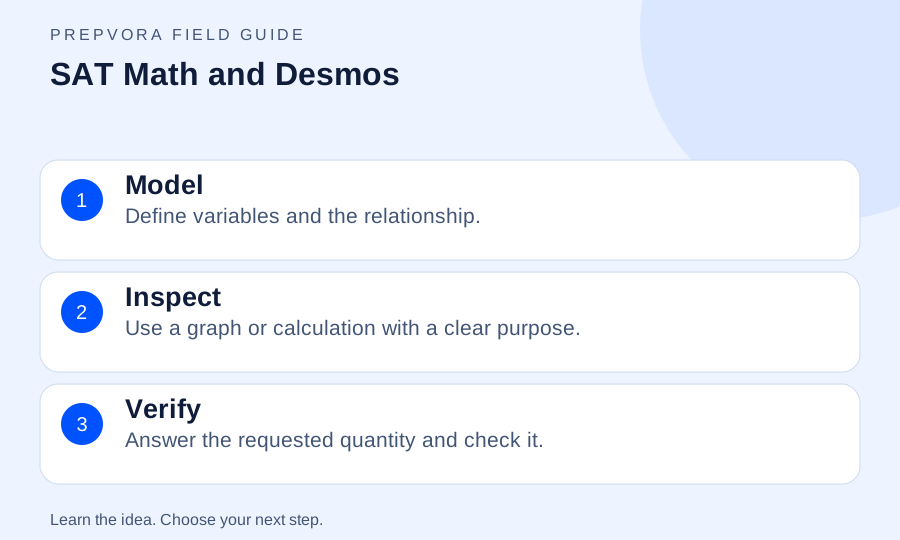
SAT Math and Desmos at a glance
A map of this article. Follow the ideas in order, or revisit the one you need.
Model
Define variables and the relationship.
Inspect
Use a graph or calculation with a clear purpose.
Verify
Answer the requested quantity and check it.
Sources & further reading
AI overview
The useful ideas to take with you.
- Translate the question into a mathematical relationship before using the calculator.
- Intersections, roots, and vertices answer different questions; inspect the wording.
- Use the current testing calculator and verify results with units, constraints, or substitution.
AI-assisted summary, saved with this article. Use the full guide for context. Confirm current exam and college policies with the official source.
Find your next step.
A diagnostic helps you identify where to focus your practice.